What is Encrypted RunAs?
Encrypted RunAs is a small utility that is designed to make the job of Administrators a little easier, it can be used to run applications or software installations with access rights a standard user does not have.
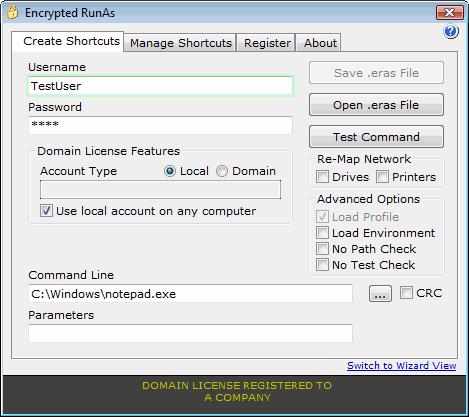
Fig 1: Main Program Screen

Fig 2: ERAS file this can be double clicked or used in scripts

Fig 3: Desktop Shortcut this can be dragged into program files or added to start up.

Why Encrypted RunAs?
When you work with computers you will soon come across software that will not work with limited user rights. Normally you would have to either add the user to the administrators or Power User group or find why the software requires administrative rights in the first place, this could be due to many reasons ie, trying to access the local machine registry, registering a DLL or OCX control etc etc.
With Encrypted RunAs installed, a shortcut to an application can be created that uses an account on the local machine that has administrator rights. Therefore only giving rights that are required for the application to run correctly and not the whole machine.
- Encrypted RunAs creates encrypted shortcuts that point to programs that need to be run with different user credentials, so the password does not need to be given to the user. Encrypted RunAs uses >
128 bit encryption for the shortcuts, the password is encrypted twice using information located on the computer/domain for extra security. - Unlike other programs of this type, Encrypted RunAs can also check that the original file the shortcut was created for has not been swapped with an unauthorized file (this prevents users from trying to run unauthorized programs with elevated privileges).
- Unlike other programs of this type, Encrypted RunAs can also check that the original file the shortcut was created for has not been swapped with an unauthorized file (this prevents users from trying to run unauthorized programs with elevated privileges).
- Most programs of this type only allow the use of .exe, .com, and .bat. Encrypted RunAs also allows the use of VBScript files (
vbs ), this can be used with the CRC feature to ensure that your administration scripts will not run with elevated permissions if the script is changed. - Checks the accounts exist on the local machine or domain before allowing the shortcut to be
tested, and then saved. - Shortcuts can easily
created on All Users Desktops and Programs Menu with Encrypted RunAs, they can also be removed using the Manage Shortcuts tool. - Any printers or network drives mapped to the current user are re-mapped when the Encrypted RunAs shortcut is run.
How can it be used?
The screenshot above (Fig 1) shows how to create
- Double clicking the icon.
- Running in a script in the format: ERunAs test.eras (test.eras is the encrypted file).
- Drag the icon over the ERunAs application and release.
Please download the manual for further information
Available Versions
Trial Version
This version can only produce shortcut files that are valid for 3 days using
Single Computer License(s)
The single computer version only allows the use of the Encrypted RunAs shortcut files on the computer that they were created on, and can only use user accounts on the local machine. This version is ideal for home computers to give extra rights to XP limited accounts and public or corporate access computers with multiple logins on a single computer.
Unlimited Computer/Domain License
This license gives the most flexibility, it offers the same features as the Single user version but can also use a
Unlimited Computer/Unlimited Domain License
This license is for companies that require the flexibility to use Encrypted RunAs on any domain/site within their company.